A complete CRM and quoting tool for mosquito mesh installation businesses. Drop one shortcode on your page — your customers get an instant price, you get a qualified lead straight to WhatsApp.
Our team is present in
YOUR AREA
today!
Enter your name and contact number below — we'll send your personalised quote with special discount and exclusive offers directly to your WhatsApp.
❌ Please enter your name.
👉 Enter a 10-digit mobile number (e.g., 9876543210).
❌ Enter a valid 10-digit mobile number starting with 9, 8, 7, 6.
Five clear steps — no logins, no app downloads, no third-party accounts.
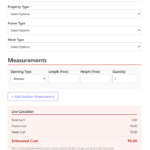
Selects area, property type, frame and mesh material. No account needed.
As measurements are typed, Frame Cost, Mesh Cost and Estimated Cost update instantly — no page reload.
A modal shows the customer's area in bold, announces a special offer, then asks for name and mobile.
WhatsApp opens on the customer's own number with the full quote pre-filled — no API, no subscription.
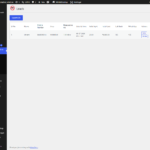
Every submission is stored in your WordPress dashboard — view, delete, and export as CSV anytime.
Placed on any WordPress page with a single shortcode. Fully mobile-responsive, validated, and conversion-focused.
A clean, validated form that captures everything needed to price a job in one go.
Customers can add as many openings as needed in a single enquiry.
Prices update instantly as the customer types — no submit, no wait, no page reload.
After calculating, a modal appears to create urgency and capture contact details.
Quote sent to the customer's own WhatsApp — no API subscription, works on any device.
Optionally sends a branded HTML email to the customer — and a copy to your inbox.
Displayed after submission — a polished summary the customer can act on immediately.
25+ currencies with configurable symbol position — covers India, GCC, Southeast Asia and beyond.
The same four formulas run in the Live Calculator and on the server — so the number on screen matches the number saved to your leads table.
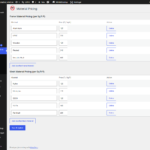
Default materials are ready out of the box. Add, edit or remove any type and set your own per-Sq.Ft rate from the Material Pricing page.
+ Add unlimited custom types
+ Add unlimited custom types
Select your currency once in Settings. The symbol and position appear consistently on the form, Live Calculator, result page, email, WhatsApp message and leads table.
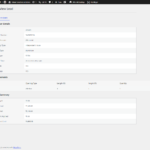
A dedicated "Mosquito Mesh CRM" menu in your WordPress admin with five focused modules.
| Sl No | Name | Mobile | Area | Measurements | Date & Time | Total Sq.Ft | Total Cost | Call Back | Actions | |
|---|---|---|---|---|---|---|---|---|---|---|
| 1 | Vincent | 8951936336 | Whitefield | 1 Door, 1 Window, 1 Balcony | 16-06-2026 04:12 PM | 141.00 | ₹74,000.00 | YES | YES | ViewDelete |
| 2 | mithu | 8971442778 | Nelamangala | 1 Balcony | 16-06-2026 03:07 PM | 100.00 | ₹74,000.00 | NO | YES | ViewDelete |
| 3 | Vincent Mathew | 9876543210 | Kammanahalli | 3 Windows, 2 Doors | 11-07-2026 10:22 AM | 210.00 | ₹1,42,800.00 | YES | NO | ViewDelete |
No coding needed. Upload, activate, configure, done.
Go to Plugins → Add New → Upload Plugin and upload yateer-mosquito-mesh-crm-pro1.zip. Click Install Now and then Activate.
Go to Mosquito Mesh CRM → Material Pricing. Enter your Frame and Mesh rates per Sq.Ft for each material type. Click Save & Update.
Go to Mosquito Mesh CRM → Settings. Set your currency, discount, Call Number, WhatsApp link, admin email and offer section content.
Edit any WordPress page. Add the shortcode with in the square "[ enter code ] code is yateer_mosquito_mesh_quote in the body. Publish — your quote form is live.
Every customer submission appears under Mosquito Mesh CRM → Leads. Export to CSV at any time for follow-up or reporting.
Quick answers to what most people ask before installing.
Place
Our team is present in Enter your name and contact number below — we'll send your personalised quote with special discount and exclusive offers directly to your WhatsApp. ❌ Please enter your name. 👉 Enter a 10-digit mobile number (e.g., 9876543210). ❌ Enter a valid 10-digit mobile number starting with 9, 8, 7, 6. on any WordPress page or post. The full quote form — including Live Calculator and popup — renders wherever the shortcode appears.
🎉 YOU HAVE A SPECIAL DISCOUNT!
YOUR AREA
today!
No. The plugin uses the standard wa.me link — it opens WhatsApp on the customer's own device and pre-fills the quote text. No API key, no Twilio account, no monthly fee.
Yes. Go to Mosquito Mesh CRM → Material Pricing. Click "Add Another Frame Material" or "Add Another Mesh Material", enter the name and rate per Sq.Ft, and save. You can also edit or delete any existing material at any time.
When a customer checks "Send by Email" and enters their email address in the popup, a branded HTML email is sent to them via WordPress's wp_mail(). A copy is sent to the admin email you configure in Settings. No external email service is required — it uses your hosting's mail server.
Yes. Add the shortcode
Our team is present in Enter your name and contact number below — we'll send your personalised quote with special discount and exclusive offers directly to your WhatsApp. ❌ Please enter your name. 👉 Enter a 10-digit mobile number (e.g., 9876543210). ❌ Enter a valid 10-digit mobile number starting with 9, 8, 7, 6. inside any shortcode block or text widget in your page builder. The plugin's own CSS and JS load only on pages where the shortcode is present.
🎉 YOU HAVE A SPECIAL DISCOUNT!
YOUR AREA
today!
Deactivating the plugin preserves all data. Deleting it via the WordPress "Delete" action removes the database table and all plugin options cleanly. No leftover rows in your database.
25+ currencies — including INR, USD, EUR, GBP, AED, SAR, SGD, MYR, AUD, CAD, JPY, BDT, LKR, NPR, PKR, ZAR, NGN, KES, QAR, KWD, BHD, OMR, MXN, BRL and more. You can also choose whether the symbol appears before or after the amount.
The plugin is designed for single-site installations. Multisite compatibility has not been tested and is not guaranteed in version 1.2.0.
One shortcode. Instant quotes. Every enquiry captured. Built for Indian mosquito mesh businesses and beyond.
Download the Plugin Visit Yateer Solutions